THE MAKING GUIDE
How to Make a Marigold Bridge AI Video from One Photo
You can make a Marigold Bridge AI video in your browser at Boo Studio. Choose one authorized adult photo, confirm permission, prepare a private order and pay $9.90 USD plus applicable tax. Verified payment starts the fixed 10-second 3D flower-bridge template. The vertical 720p MP4 includes original gentle music; no editing app or written prompt is needed.
Open the adult-photo generator · $9.90 USD ↗THE ACTUAL EXAMPLE
One source photo. One generated video.
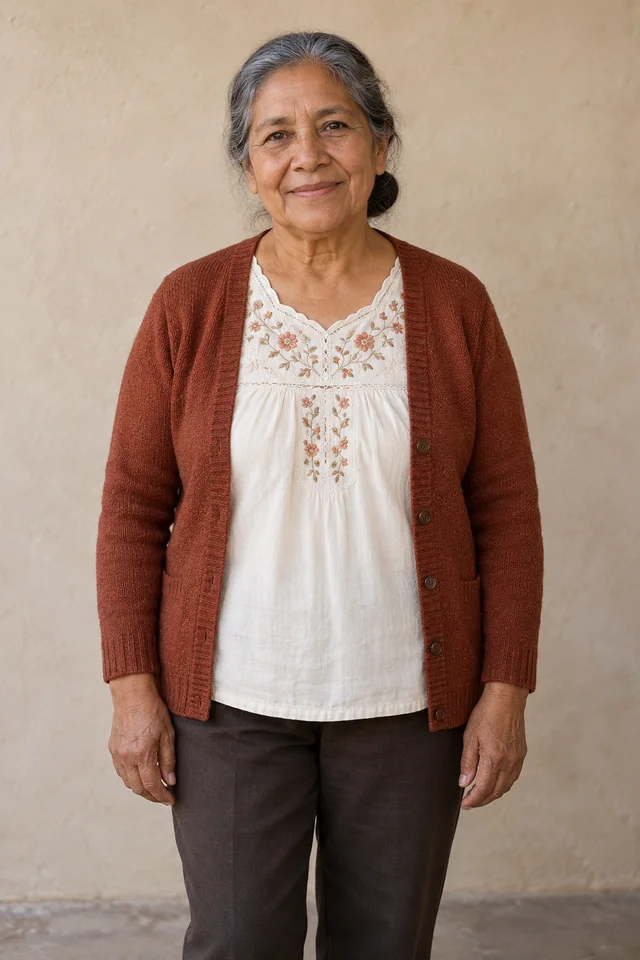
The portrait is an AI-created fictional adult. The video is our actual generated result, using the same fixed direction and music processing as new paid orders. Watch with sound. This is one example, not a promise of identical results.
1. Watch the actual result before choosing a photo
Play the video on this page with sound. It is a real generated result from the fictional adult portrait shown beside it, not a customer testimonial or an original trend clip. The subject walks on glowing orange petals, pauses, gathers loose petals and looks up as petals rise.
The example uses the same fixed generation direction, motion reference and Petals Remember music processing as new paid orders. Each video is generated anew: a person’s likeness, hands, clothing details and exact timing can differ. Choose this tool if that 3D bridge scene is what you want.
2. Choose one authorized adult portrait
Use a clear face in even light. A half-body or full-body photo also gives the model clothing information; a small headshot requires the rest of the outfit to be imagined. Crop a group photo to one adult before selecting it.
You must own the photo or have explicit permission for the processing and intended use, including the appropriate family or estate rights holder’s authorization when needed. The template supports adult humans only, not pets, minors or public figures.
- JPG, PNG or WebP, up to 8 MB.
- At least 301 pixels on each side, with a suitable portrait aspect ratio.
- For a print, scan it straight and avoid glare over the face.
3. Prepare the photo locally, then review the order
The generator first prepares the selected image in your browser. Confirm the adult-photo permission statement and continue. This saves one local draft with one hour of access; creating a new draft replaces the previous one. No video is generated at this stage.
On the review page, check the source photo, Marigold Bridge product name, 10-second format and price. Separate upload authorization and a browser security check come before private upload. Uploading prepares an unpaid order; it does not start generation.
4. Pay once and keep your private order access
Use the payment button in your own private order. The price is $9.90 USD, with applicable tax shown by Waffo before payment. There is no subscription, account requirement or credit pack. Do not use an example or someone else’s order link to pay.
Generation starts only after the production payment is verified. Keep your private order link and access in the same browser. The page reports the actual status; we do not promise a fixed completion time or provide a personalized video before payment.
5. Download the finished MP4, already with music
When the order confirms a completed video, use its authorized download action. The deliverable is 10 seconds, 9:16 vertical and 720p, with the original Petals Remember instrumental included. It contains no speech or singing. You can play or share it without adding another soundtrack.
Download promptly: order and file access ends within 24 hours of order creation. You can add a caption in your publishing app, but this template does not add names, an altar ending or a farewell wave. Ask the family before posting a remembrance publicly, and make clear that the scene is AI-generated.
If the generation does not complete
A confirmed generation failure with no completed video automatically requests a full refund to the original payment method, including tax. Uncertain outcomes need manual review. Bank and payment-provider processing determines when the refund appears; an unclear status does not mean you should buy again.
Common questions
Do I need CapCut or an animation prompt?
No. Boo Studio runs a fixed adult flower-bridge template in the browser. You choose a photo and complete the private order flow; the camera direction and actions are already configured.
Can I use it for a pet?
No. This template supports one adult human only. A pet memorial is a different scene and is not offered by this generator.
Sources and product information
This guide describes our own template and the example shown above. It is published by the tool’s operator, not an independent comparison or customer review.